Automated messages can build loyalty—or make customers ignore you. Here’s which messages to automate, when to send them, and why they can make a difference to your sales.
Most companies think they are using automation when, in reality, they are simply sending mass messages that customers delete without a second thought. The difference becomes clear only when a message responds to a purchase, inactivity, loyalty points, or an important date—instead of following your marketing calendar.
Automated messages in brief:
- Automated messages are triggered by customer behavior—such as purchases, visits, or inactivity—without requiring someone to send them manually each time.
- They work when they are based on the right data and delivered at the right moment. They become annoying when they are generic and sent to everyone.
- For physical stores, the trigger is not an abandoned cart but a loyalty card—specifically, the customer’s last visit, spending history, or points that are about to expire.
- A system that tracks these signals automatically turns customer data into repeat purchases.
One company sends the same SMS to every customer once a month and calls it automation.
Another sends nothing because “we don’t have time for that.” As a result, a customer who has not visited for 40 days simply goes to a competitor—and nobody even notices.
Both companies are making the same mistake: they treat automated messages as just another advertising channel instead of a system that responds to customer behavior.
The difference between a message that generates a purchase and one that gets deleted—or, worse, prompts an unsubscribe—rarely lies in how creative the copy is. It almost always comes down to whether the message reaches the right person at the right time, based on something that person has actually done.
That is the essence of message automation—and this is where most companies make the same mistake: they assume it is either too expensive and complicated or simply a chatbot that responds to customer inquiries.
It is neither.
What Are Automated Messages and What Are They Used For?
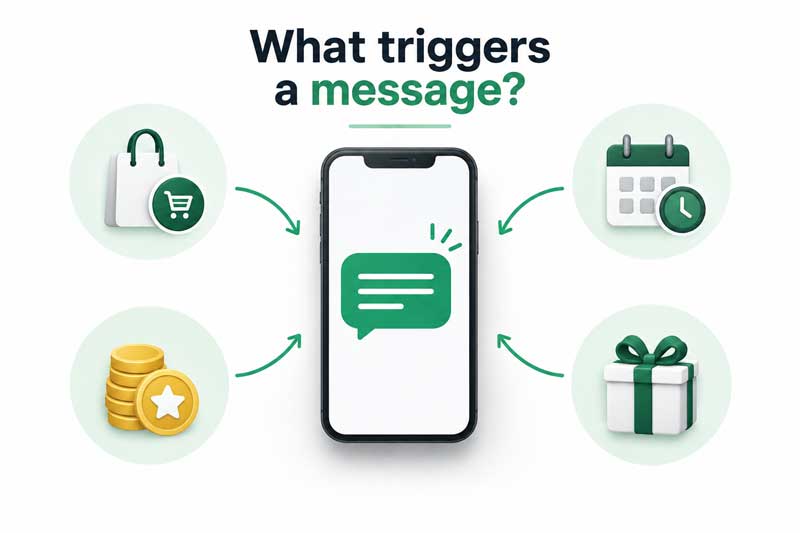
Automated messages are predefined emails, SMS messages, Viber messages, or push notifications that are sent automatically when a customer does—or does not do—something specific: makes a purchase, registers, fails to return for a certain number of days, or earns enough points for a reward.
The system recognizes the trigger and sends the message without requiring manual involvement from the marketing team.
Let’s clear up one misconception right away: message automation is not the same as a customer support chatbot.
A chatbot answers questions customers ask in real time. The message automation we are discussing here is something different—a marketing and loyalty system that sends messages based on customer behavior, not on a question they have asked.
One manages communication; the other drives sales and builds loyalty. Confusing these two concepts is a common reason companies believe they “do not need” message automation—because they already have someone responding to Viber messages.
Why Manual Messaging Does Not Scale
When you have 200 customers, sending messages manually is manageable. You wish someone a happy birthday, remind another customer that their coupon is about to expire, and that is about it.
The problem begins when your customer database grows to 2,000, 5,000, or 20,000 customers. At that point, manually tracking who does what becomes a job for an entire department—which you probably do not have.
Realistically, if you have 5,000 customers and want to send each of them a birthday greeting, a reminder after 30 days of inactivity, and a confirmation when they redeem points, that amounts to more than 15,000 individual decisions every month about who should receive what and when. Nobody does that manually.
As a result, these messages are either not sent at all or sent to everyone at once, on the same day, regardless of where each customer actually stands in their relationship with your brand.
A spreadsheet containing a customer list does not send messages. It simply waits for someone to open it—and by then, it is already out of date.
What Types of Automated Messages Are There?
Automated messages are generally divided into four categories according to what triggers them:
- Transactional messages—purchase confirmations, booking confirmations, or notifications that loyalty points can be redeemed for a discount. Customers expect these messages, so they tend to have the highest open rates.
- Behavioral messages—responses to a specific action: adding a product to the cart without completing the purchase, buying from a particular category for the first time, or reaching the spending threshold for the next loyalty tier.
- Lifecycle messages—messages that reflect the stage of the customer relationship: welcoming a new customer, reactivating someone after a period of inactivity, or marking a birthday or the anniversary of their first purchase.
- Service messages—appointment reminders, back-in-stock notifications, or updates that an order is ready for collection. They do not sell directly, but they build trust by saving customers time.
The goal is not to automate everything at once. It is to identify which of these four categories can deliver the greatest value to your business—and start there.
A Physical Store Does Not Have a Cart, but It Does Have a Card
Most articles about message automation focus exclusively on webshops—abandoned carts, link clicks, and newsletter subscriptions. That makes sense for e-commerce, but it leaves businesses operating in physical locations without an answer: supermarkets, pharmacies, boutiques, and restaurants.
Let’s be honest—a physical store does not have a “cart” that customers abandon, but it has something equally valuable: a loyalty card. Every time a customer scans it at the checkout, it leaves a trail. That card reveals when the customer last visited, how much they spend on average, which category they choose most often, and whether their points are about to expire. These are triggers just as much as clicking the “Buy” button on a website—the only difference is that they come from a physical checkout rather than a browser.
This is why retail triggers look different: “30 days without a visit” instead of “cart abandoned an hour ago,” or “spent more than $ 500 this month” instead of “viewed the same product twice.” The logic is the same—respond to behavior, not the calendar—but the source of the data is a loyalty card rather than a browser cookie.
If you already have this data but are not using it for automated messages, you are leaving your most cost-effective marketing channel idle.
Which Channel Should You Use for Each Message?
Not every message is suitable for every channel. Email provides enough room for detail and works well for confirmations and lifecycle sequences.
SMS messages have the highest read rates and perform best for urgent, concise reminders—such as an expiring coupon or a product that is ready for collection.
Viber combines the speed of SMS with richer visual options, allowing you to include an image or coupon directly in the message.
A push notification delivered through a mobile app is the fastest option, but it requires the customer to have already installed the app.
In practice, you do not have to choose just one channel. Marketing automation allows the same sequence to run across several channels: first through Viber and then, if the message has not been opened within 24 hours, through SMS. The customer receives the message where they are most likely to see it—not simply through the channel that is cheapest for you.
Segments Are Half the Job—The Other Half Is Sending the Right Message
So far, we have covered the types of messages available and the channels used to deliver them. But one question remains unanswered: who exactly should receive each message, and when?
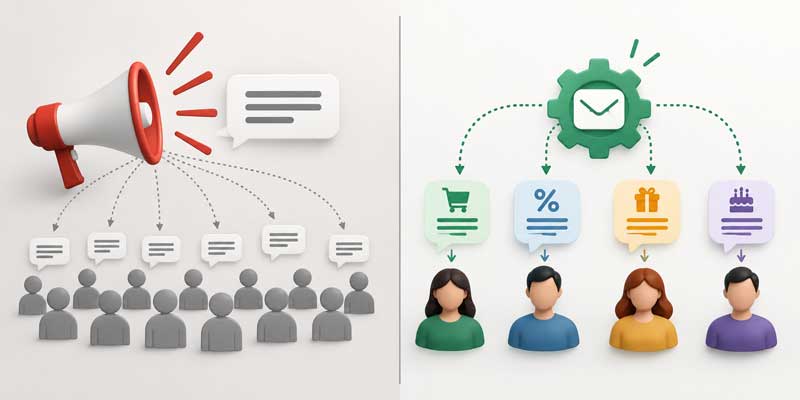
The answer is not “send everyone the same message.”
A customer who shops once a week and one who has not visited in 60 days should not receive the same message—even when the trigger is identical, such as a new product launch. The first customer needs to be informed; the second needs a reason to return. This is where segmentation based on the RFM model (recency, frequency, monetary value) comes in. The system identifies your most valuable customers, those whose engagement is declining, and those who have already become inactive. It then sends each group a different message based on a different trigger.
This is exactly what the Spotlight platform does automatically through its loyalty program. It connects loyalty card data with RFM segmentation, ensuring that automated messages do not follow the same template for everyone. Instead, they adapt to the behavior of each customer segment—without requiring your team to track every customer’s stage manually.
The Most Common Message Automation Mistakes
Automation does not mean less human interaction. It means less guesswork. However, when poorly configured, it achieves the exact opposite of what it should:
- Sending everyone the same message. Automation that sends the same text to the entire database at the same time is not really automation—it is a mass message with an extra step. It does not solve the problem; it merely accelerates it.
- Sending too many messages. A customer who receives five messages a week will stop reading them, then stop opening them, and eventually unsubscribe. One attempt to re-engage them is reasonable; the fifth gives them a reason to block you.
- Sounding like a robot. “Dear customer, we would like to inform you…” Nobody responds warmly to a message like that. An automated message should sound as though someone genuinely wrote it—the system simply chooses the right moment to send it.
- Failing to measure results. If you do not track which messages generate purchases and which merely consume your messaging budget, you could continue repeating the same mistakes for months.
Where Should You Start With Automated Messaging?
You do not need to automate everything at once. If you are just getting started, four messages offer the greatest impact with the lowest risk:
- Welcome message for a new customer—make a strong first impression while their interest is at its highest.
- Reminder for inactive customers—sent after 30 to 45 days without a visit or purchase.
- Expiring points notification—give customers a reason to return before losing what they have already earned.
- Purchase confirmation with a next step—not just a “thank you,” but also information about how many points they earned and what they can do next.
Once these four are working effectively, it makes sense to add more advanced automations—such as reactivating the VIP segment, seasonal triggers, and messages related to specific product categories.
Frequently Asked Questions About Automated Messaging
Is Message Automation the Same as a Customer Support Chatbot?
No. A chatbot responds to questions that customers ask during a real-time conversation. The type of message automation discussed here sends marketing and loyalty messages based on customer behavior—such as purchases, visits, and inactivity—without the customer having to initiate a conversation. The two systems can be used together, but they solve different problems.
How Many Automated Messages Are Too Many?
There is no universal number, but when customers begin ignoring messages or unsubscribing, it is a sign that you have crossed the line. For most retailers, a reasonable guideline is one or two relevant, trigger-based messages per customer each week. Transactional messages are a clear exception because customers expect to receive them.
Does Message Automation Make Sense for a Small Store, or Only for Large Chains?
It makes sense for small stores too—perhaps even more than for large chains—because every customer who does not return has a greater impact on a smaller customer base. Platforms such as Spotlight work for both a single location and a large retail chain. The difference lies in the volume of data, not in whether the system is worthwhile.
Which Channel Has the Highest Open Rate for Automated Messages?
SMS and Viber typically have the highest read rates because they reach customers directly on their phones and rarely remain unopened. Email generally has a lower open rate but provides more space for details and longer content. The right channel depends on whether the message is urgent and concise or longer and more informative.
Does Message Automation Work Without a Loyalty Program?
Partially. Without a loyalty program, you can still automate transactional and basic service messages, such as order confirmations and appointment reminders. What you lack is a source of data about customer behavior in a physical store. Without a card or app, the system has no basis for distinguishing an inactive customer from a VIP customer.
Automated Messages Work When They Work for the Customer—not Just for You
Message automation is not a tool you can switch on and forget. It requires customer data, clearly defined segments, and continuous monitoring and adjustment. Once properly implemented, however, it can do what manual work cannot: respond immediately, consistently, and individually to every customer—without someone on your team having to track who needs to receive a message that day.
If you already have data about customer purchases and visits, there is no reason to let it gather dust. Stop sending the same message to everyone and hoping someone happens to need it that day. Spotlight brings your loyalty program, customer data, and automated messaging together in one place, ensuring that each customer receives a message that is relevant to them at the moment they are most likely to read it.